
The Marketing Tools I Actually Use and Recommend in 2026
I look at marketing tools for a living. I've tested hundreds. Most of them are fine. A few of them I genuinely love, and I find myself recommending the same set over and over when someone asks me what they should actually use.
This is that list.
These are organized by the job you need done rather than ranked one to ten, because that's how buying decisions actually work. And I'm only including things I would install today if I were starting from scratch.
For thinking and drafting: ChatGPT or Claude
I resisted this for longer than I should have. Now I genuinely cannot imagine my workweek without one of these open. I use them for the constant background work of drafting, riffing, summarizing research, turning a messy voice note into a structured brief, and pushing back on my own ideas. When it comes to content I publish, I still write that myself. AI can assist with the process. I decide what to say, how to say it, and what is ready to publish.
Both are useful, and I flip between them depending on the task. In my own use, Claude tends to be more careful with a tight brief, while ChatGPT is more willing to explore several directions. That is a working preference, so try the same task in both before choosing.
The free tiers are usable. A paid tier starts to earn its cost when the limits interrupt work you do every day.
For understanding your site: Google Analytics + Search Console
These two free tools give most small teams the core picture of acquisition and conversion, yet many teams set them up and rarely inspect the reports that would change a decision.
Search Console is the one I think is genuinely underused. It shows you the queries people are already using to find you, including the ones where you rank on page 2 and could plausibly move to page 1 with a focused edit. That's free traffic you're leaving on the table.
GA4 has a rough interface but the data is real. Set up three or four conversion events that map to things you actually care about (a signup, a demo request, a purchase) and ignore everything else until those make sense.
For keeping track of people: HubSpot
The free CRM is genuinely good as a place to keep contacts organized, log conversations, and stop losing track of people, all without paying a dollar.
The honest caveat is that it is more limited than the version people still rave about. New accounts now cap at 1,000 contacts, where it was once effectively unlimited, plus two users, with automation and some reporting behind paid tiers. So it is a great place to start, but depending on how fast your list grows, you may hit that ceiling in a year or two rather than coasting on it for years.
If your needs are more complex, Klaviyo belongs on the e-commerce shortlist and ActiveCampaign is one option I would test for B2B lifecycle automation after HubSpot's free limits become restrictive.
For email: Brevo or MailerLite
These two have quietly become my go-to recommendations for anyone starting or rebuilding an email program, and the reason is mostly pricing. (If you are weighing platforms seriously, I go deeper in this email buyer's guide.)
Brevo uses send-volume pricing. If you have a large list that you mail once a month, the stored contacts do not increase the bill in the same way they do under Mailchimp's contact-based model.
MailerLite is the one I recommend when simplicity matters. The builder is clean and the automation is intuitive. Its free plan became much tighter in 2026, so I treat it as an easy place to start instead of the most generous free option. Brevo and Sender stretch further for teams prioritising allowance size. For a small, simple program, MailerLite is still the nicest for me to use.
For e-commerce, Klaviyo is the first platform I would test when purchase data and behavioral segmentation drive the program. The premium is worthwhile only if the team will use that depth.
For design: Canva
Canva covers the routine social posts, presentations, and basic brand assets that used to send me back to a designer for every small change. The thing I'd tell every new user: set up the brand kit on day one. Lock in your fonts and colors. It saves you from the slow drift into off-brand content that nobody actively chose to create.
For social scheduling: Buffer, Later, or Hootsuite
The most important thing a scheduler does is let you write a week of posts in one sitting and then stop thinking about it. The psychological benefit of that is underrated.
Buffer is the one I recommend for small teams: the interface is genuinely simple, and the free plan covers enough channels and basic analytics to get started without drowning you in features you won't touch for months. Its free reporting is shallow, so if analytics is your priority, Publer and Metricool give you more for nothing. For plain, painless scheduling, though, Buffer is still the easiest on-ramp.
Later is stronger if Instagram and TikTok are central to what you do: the visual calendar is excellent for visual-first content planning.
Hootsuite and Sprout Social are what you'd look at once you're managing multiple brands or need team workflows and approvals. More powerful, significantly more expensive.
For SEO research: Semrush or Ahrefs
Both have free tools that are useful for light research. I reach for Semrush when I want PPC data, site audits, and content suggestions in one place. I reach for Ahrefs when backlink investigation and a focused keyword workflow are the main job. Run the same research task in both before committing to a paid plan.
The tactic I keep coming back to with both: find the keywords where you rank between positions 8 and 20. Those are the pages that need the least work to move, whether a focused update, a better meta title, or a few more internal links, and they can generate meaningful traffic gains relatively quickly.
For short video editing: CapCut or Opus Clip
Two I reach for here: CapCut for editing (free, good for quick cuts and captions) and Opus Clip for repurposing longer recordings into short clips with AI. If short video is part of your distribution, both are worth trying before you pay for anything else.
Where to go from here
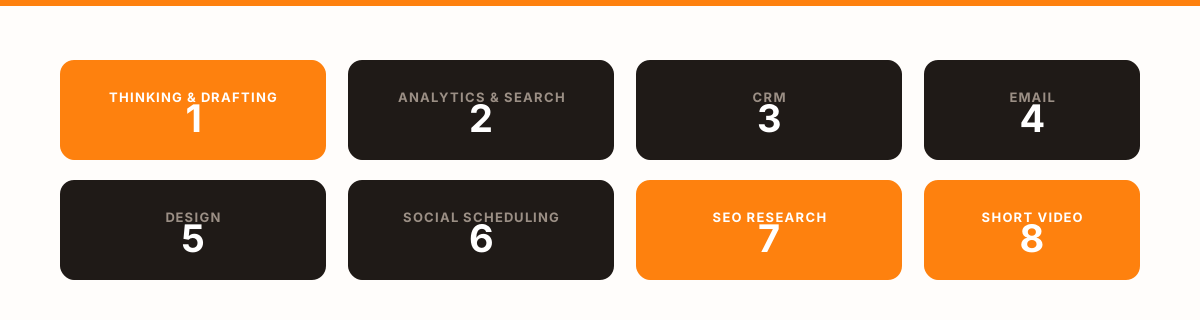
That is the shortlist, grouped by the job each one does. You don't need all of them at once. Most teams grow into the stack over time rather than buying everything upfront.
If you are comparing options within any of these categories, Mardex lets you filter by free plan, pricing model, company stage, and use case. It's faster than opening ten tabs and reading ten pricing pages.